Real-Time Transformations
Real-Time Transformations (RTT) allow you to process only the records that have changed since the last execution. Think of this as the "Delta Load" equivalent for your transformation logic.
Unlike Batch Transformations, which drop and recreate tables from scratch every time, RTT merges new or updated data into your existing tables. This results in:
Faster processing: Reduced calculation overhead by focusing only on changed data.
Improved stability: Predictable runtimes and lower risk of timeout errors.
Better resource usage: No need to constantly process millions of static records.
Unlike standard transformations managed in Data Jobs, RTT is configured within the Replication Cockpit.
Logic location: Enter your SQL in the Transformation Configuration tab of your specific table.
Automatic trigger: The transformation runs automatically as soon as that table’s delta extraction finishes.
While powerful, RTT is most effective when applied strategically.
Use case | Recommended approach |
|---|---|
High-Frequency Data (e.g., Order Statuses, Logistic Milestones) | Real-Time |
Event Logs/Activities (The fuel for Process Mining) | Real-Time |
Static Master Data (e.g., Company Names, Country Codes) | Batch (scheduled) |
Complex Aggregations (e.g., Multi-year financial KPIs) | Batch (scheduled) |
The most significant change is how data is updated. Use this table to understand the fundamental shift in logic:
Transformation Type | Logic (simplified) | Example diagram |
|---|---|---|
Batch Transformation | The target table is dropped (deleted) and rebuilt from scratch using all available records. | 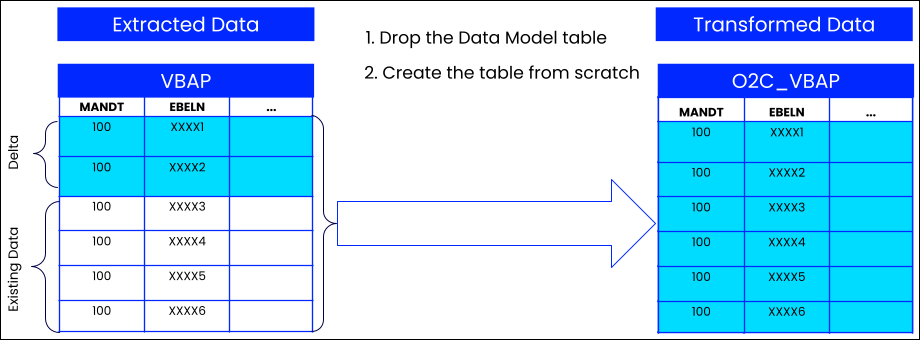 |
Real-Time Transformation | The target table stays in place. New or changed records (the delta) are merged into the existing table. | 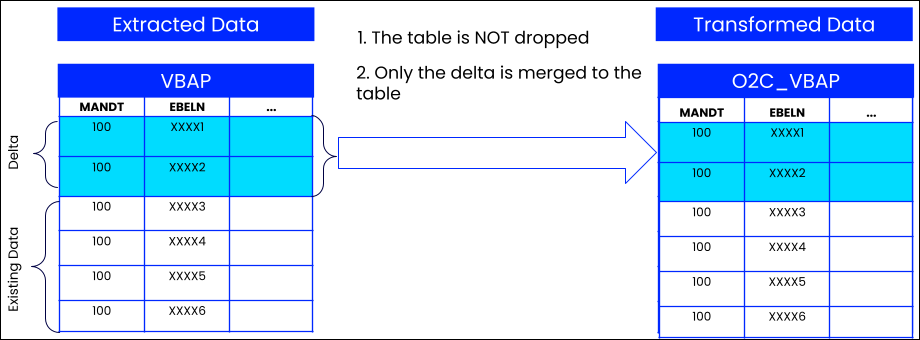 |
To use RTT effectively, you need to understand three key components:
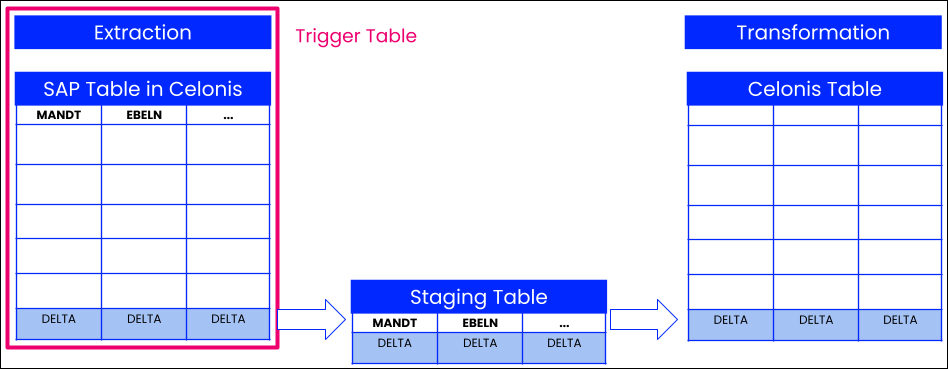
Trigger Tables: Transformations are defined at the Table Level. A "Trigger Table" is the primary table that tells Celonis to run the logic.
The One-Table Limit: You can only assign one Trigger Table per transformation.
Execution: The transformation logic only kicks off when the Trigger Table completes a delta extraction.
Choosing a Trigger: Always pick the table that is updated most frequently or is the "driving force" of the process (e.g., Sales Items VBAP).
Note
Replace
[TableName]with the actual name of your trigger table, e.g.,_CELONIS_TMP_VBAP_TRANSFORM_DATA.)Staging Tables:
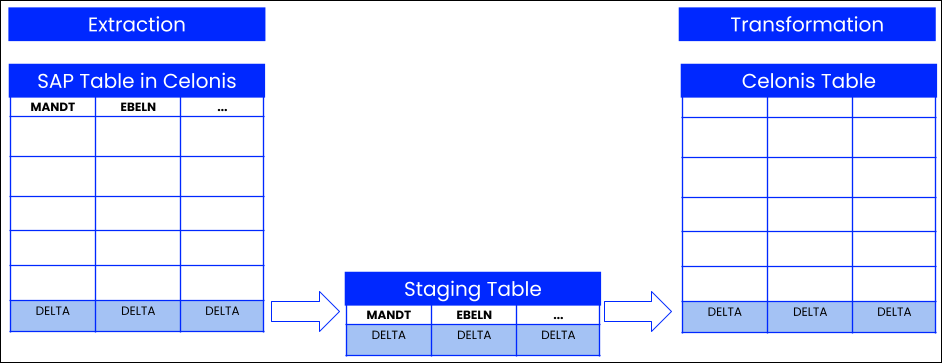
To process only the changed data, your SQL must pull from temporary staging tables instead of the standard data tables.
To process new or updated records, use::
_CELONIS_TMP_[TableName]_TRANSFORM_DATATo handle deleted records, use:
[TableName]_DELETED_DATA
Tip
In your SQL script, simply find your
FROMorJOINstatements and replace the standard table name with the corresponding Staging Table name.Dependencies: If your transformation joins the Trigger Table with other tables, define them as Dependencies to ensure data consistency.
Mandatory for Inner Joins: Always define a dependency for tables used in
INNER JOINstatements to avoid missing records.For example: You are transforming Sales Order Items (
VBAP) and joining them to the Header table (VBAK). In this case, SetVBAKas a dependency. If an item arrives but the header hasn't been extracted yet, the system waits. This prevents the record from being dropped entirely by yourINNER JOINlogic.Optional for Left Joins: Only define the dependency if you want to prevent
NULLvalues. If defined, the system will "wait" to process the trigger record until the dependent record is available.For example: You are joining a Vendor table (
LFA1) to your Invoices to get a vendor name. In this case, setLFA1as a dependency. The transformation will only process the invoice once the vendor details are available. If you don't set this dependency, the invoice will process immediately, but the vendor name column will beNULL.