Troubleshooting Task Types
You can view the status of your Task Types in the Task Management screen. If there are any problems with your Tasks an error will appear in the status column next to your Task Type.
To find the overview of all Task Types available in your Studio package, go to your Studio package and select Task Management.
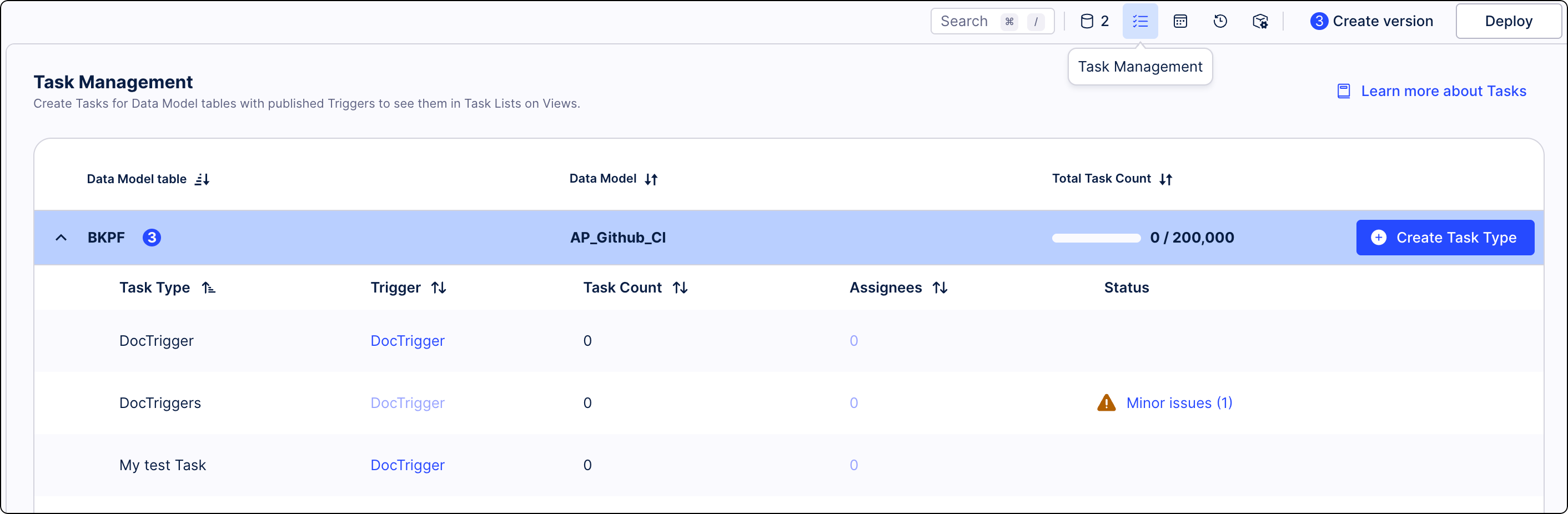
The Status column gives you an insight into the condition of your Task Types. If there are any issues with your Task Types, an error will be displayed in that column. Status is displayed only when there are any issues with Task Types.
We divided error types based on their importance:
Warnings are configuration issues are problems that don’t prevent Tasks from functioning but might affect their overall performance. Common issues that can generate warnings are:
unpublished changes
missing Action Flow
missing assignee
missing group or user
The best way to resolve most minor issues is to edit a Task Type and add any missing values. See Editing Tasks Types. In case of any unpublished changes that might prevent Tasks from functioning properly, publish your Studio package for the changes to take effect. See Versioning and deploying packages.
Errors prevent Task Types from functioning completely. You must resolve all major issues to continue using Task Types. There can be many causes for these issues. Here are common ones with suggestions on how to solve them.
Task Types subscribe to Triggers with ID of users who created the Task Type. If that user is removed from the team, the Task Type will no longer receive any updates and the Task subscription logs will return the could not impersonate for subject error.
Solution:
You must create a new Task Type with a new user to regain this functionality.
During the first publication of a Task Type, an augmentation table was not created, or the Task Type didn't subscribe to the Trigger.
Solution:
Try publishing the package that contains the Task Type again using the retry button in the error information. If you still see the error, check if an augmentation table can be created for the Data Model table used in the Task Type. Finally, verify if the trigger used in this Task Type works correctly by going to Studio and selecting your package > your Knowledge Model >Triggers. For the most common errors with triggers and ways to solve them, see Triggers troubleshooting.
The Data Model or a Data Model table linked to the Task Type no longer exists, typically, due to user configuration issues.
Solution:
In Studio, go to your package > your Knowledge Model > Triggers.
Edit the trigger associated with the Task Type.
Specify a new Data Model table.
The Trigger used in the Task Type does not exist.
Solution:
Create a new Trigger and add it to the Task Type. See Creating Triggers using Data Model. Make sure you create the new Trigger in the same Knowledge Model as the previous Trigger.
Tasks are not visible after changing the knowledge model variable.
Solution:
When you change the variable value, only Task created using the Task Types screen are transferred. Task created using Skills are not transferred with the knowledge model variable change.
Note
Transfers are only supported when changing the value of a variable, not when switching to a different variable.