Configuring a custom help link
In addition to the help materials and support channels Celonis provides, you can add your own custom help link to the Celonis Platform help menu. By enabling this feature, you can add a link that appears directly in the platform's help menu, directing users to internal documentation, a specific team portal, or other custom support tools relevant to your organization.
Custom help links are a good way to direct your users to resources such as:
Internal documentation: Processes or guidelines specific to your organization’s use of Celonis.
Team portals: Access to internal Centers of Excellence (CoE) or community pages.
Support tools: Direct access to your internal IT help desk or specialized support request forms.
This is an example of a custom link:
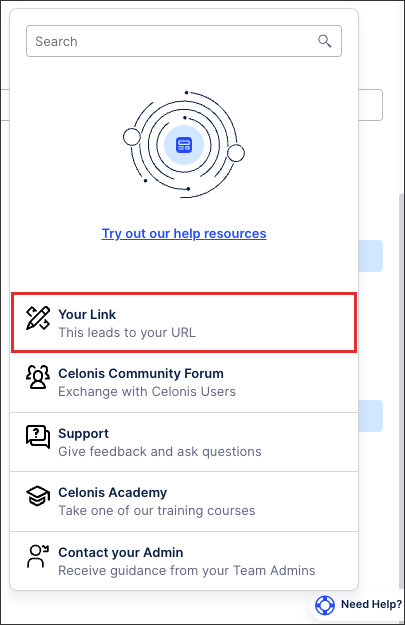 |
To configure a custom help link for your Celonis Platform team:
Click Admin & Settings - Settings.
Scroll down to Admin configuration and toggle Enable custom help link.
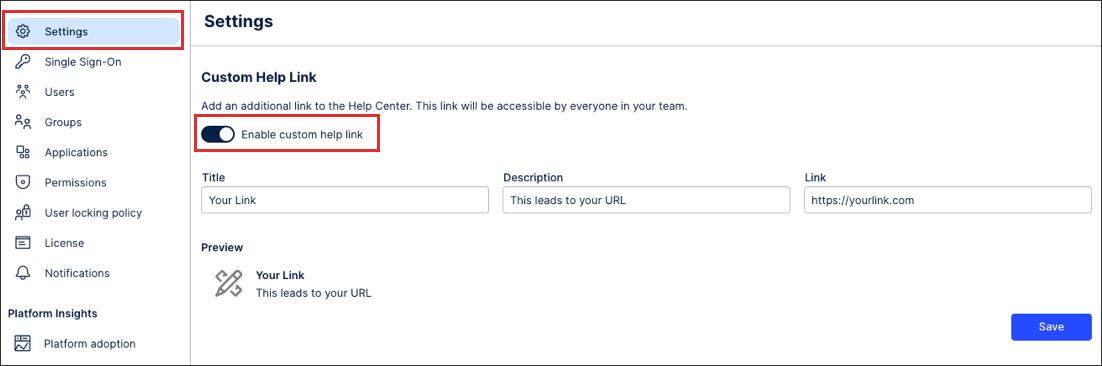
Enter the following fields:
Title: A clear name for the resource (e.g., "Internal Support Portal" or "Company Documentation").
Description: A short explanation of what the user will find when they click the link, helping them choose the right support path.
URL: The direct destination, whether it's an internal wiki, a SharePoint site, or a ticketing system.
Click Save.
The custom help link now appears for all users in your Celonis Platform team.