Outbound Data Sharing
This feature is currently available as a Private Preview only
During a Private Preview, only customers who have agreed to our Private Preview usage agreements can access this feature. Additionally, the features documented here are subject to change and / or cancellation, so they may not be available to all users in future.
For more information about our Private Preview releases, including the level of Support offered with them, see: Feature release types.
Celonis Outbound Data Sharing allows you to securely and efficiently share valuable process intelligence data from your Celonis Data Pools with other platforms in your data ecosystem. This allows you to utilize Celonis as a central Intelligence Layer for your organization.
Outbound Data Sharing bridges the gap between process intelligence insights and your central data lakes and analytics tools, enabling new cross-platform use cases.
Share Semantic Intelligence: Export business-ready semantics, specifically Object and Event tables, to third-party analytics platforms to maintain Celonis-aware context.
Modern Data Interoperability: Integrate with major data lakes using Delta Sharing as an established standard.
To see a demonstration of establishing a connection and sharing data using Outbound Data Sharing, view the following video:
This section details the requirements for using Outbound Data Sharing.
Data scope
Outbound Data Sharing is optimized for transferring the core components of your Process Intelligence Graph. Review the following scope to ensure your data is prepared for sharing.
Supported Data Pools: Your Data Pool must be using the ETL Engine. For more details, see ETL Engine.
Supported Data: Physical Object and Event tables residing within an OCPM Schema.
Note
Only data within OCPM schemas is eligible. Standard relational tables outside of these schemas cannot be shared.
Unsupported Data: PQL Calculations, Knowledge Models, and SQL or PQL Views cannot be shared. Outbound Data Sharing is currently limited to materialized data.
Tip
To share logic contained in a view or a specific PQL calculation, you must first materialize that data into a physical table within your Data Pool before it can be shared.
Supported platforms
Outbound Data Sharing is supported for the following target platforms:
Databricks
Platforms that support consuming Delta Shares via OAuth (Client Credentials) can receive data from Celonis.
Supported authentication types
Outbound Data Sharing currently supports OAuth Client Credentials.
This section describes the basic setup of a Outbound Data Sharing connection. To configure the connection:
In the Celonis Platform left navigation, select Data > Data Integration.
On the Data Pools screen, find the data pool you want to share using Outbound Data Sharing.
Note
Your Data Pool must be using the ETL Engine. For more details, see ETL Engine.
Select the Options (⋮) menu to the far-right of the row, and then select Share data externally (as shown below). This opens the Create new share window.
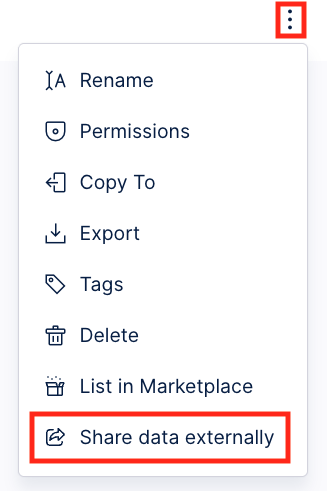
In the Set up step of the Create new share window, fill the following fields:
Share name: Provide a unique name for this Outbound Data Sharing connection.
Description: (Optional) Provide a detailed description to help other users understand the purpose of this Outbound Data Sharing connection.
Authentication setup (Oauth 2.0): Currently, only Client Credentials is supported, which is automatically selected.
Once the fields are filled, select Create share. This creates the share and opens the Select data step.
In the Select data step, select the tables or full schemas to share. Optionally, select the toggle on the right side if you want new tables in the schema to be shared automatically.
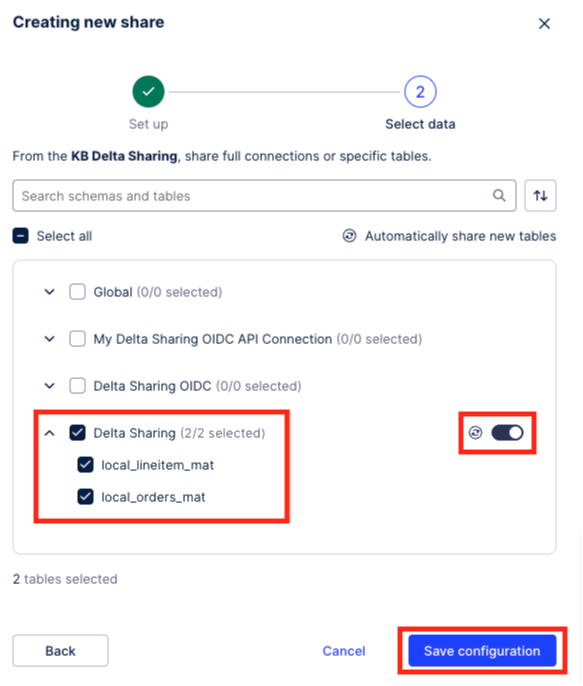
Once complete, select Save configuration. This opens the Share data externally window.
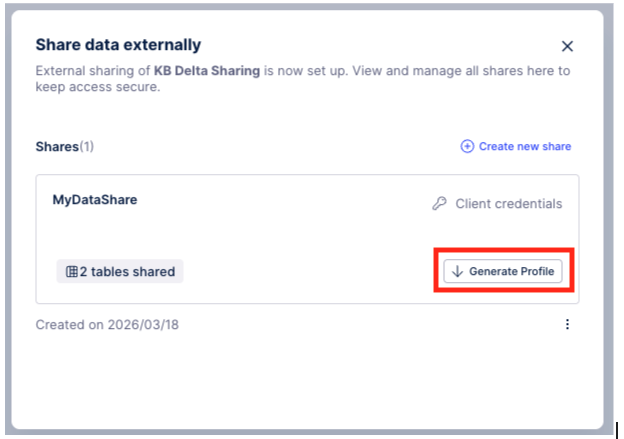
In the Share data externally window, select Generate Profile to download the Delta Sharing profile.
Note
After initially downloading the file, it can only be downloaded again by rotating the token.
You can now import this .share file in your desired data platform (such as Databricks).