Using CEL expressions in Orchestration Engine
Orchestration Engine uses Common Expression Language (CEL) whenever your configuration involves data mapping. CEL is an expression language that offers a safe and highly customizable way to map your incoming data.
Here are some rules for creating the most common expressions in CEL to get you started. For more information on CEL syntax, see cel.dev.
Static text must be wrapped in double quotation marks (“ “).
request.payload.status = “APPROVED”
Context variables and system properties must NOT be wrapped in double quotation marks (“ “).
If you wrap a variable in quotation marks, the system will identify it as standard text.
settings.target_vendor = request.payload.vendor_name
Numerical values must NOT be wrapped in double quotation marks (“ “).
double(json.invoice_amount) > 50000.0
When branching in Process Orchestration, the condition builder allows you to reference values from the output of a Process Orchestration run and combine them with CEL expressions. When combining CEL expressions and context variables, you must use the plus sign (+).
context.source_system + request.payload.invoice_num
Note
When you start defining your condition for the first time, there is no output you can reference. You must start a test run. Alternatively, you can map these values manually using the following expression:
contextEventPath("event-name:property")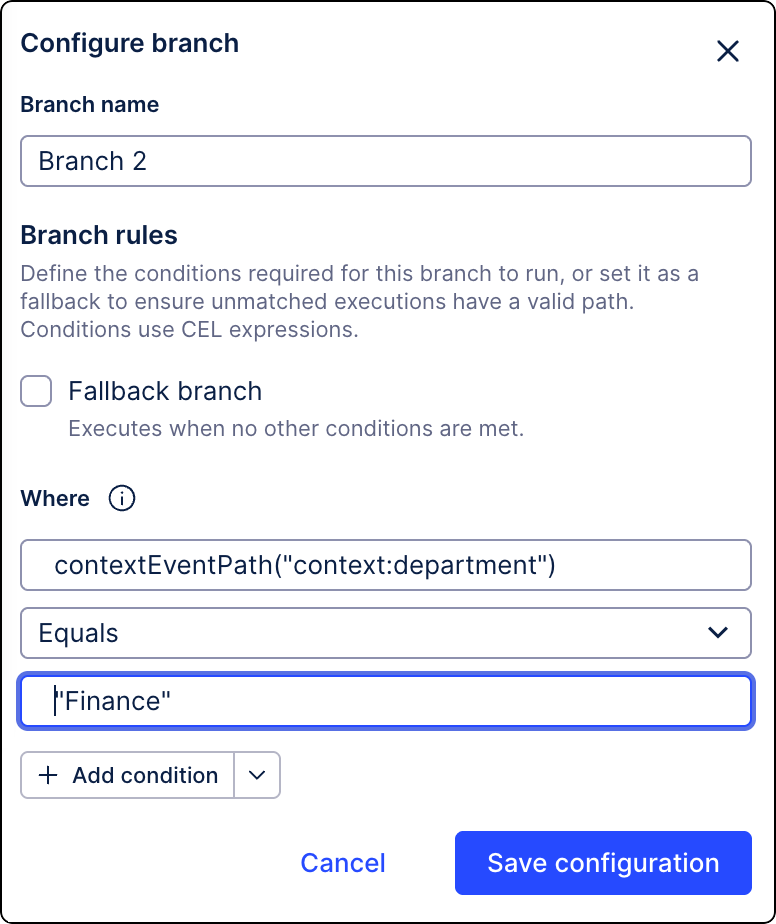
Use the plus sign (+) to combine mapped data with static values:
NAME1 + "VIP customer"
Use the standard arithmetic operators (+, -, *, /, %) for any sort of calculations:
"Sales_Order_Items"."Price" * "Sales_Order_Items"."Quantity"
To enter special characters, you must use a backlash (\) to escape them:
resource.path.startsWith("C:\\Users\\Admin")